

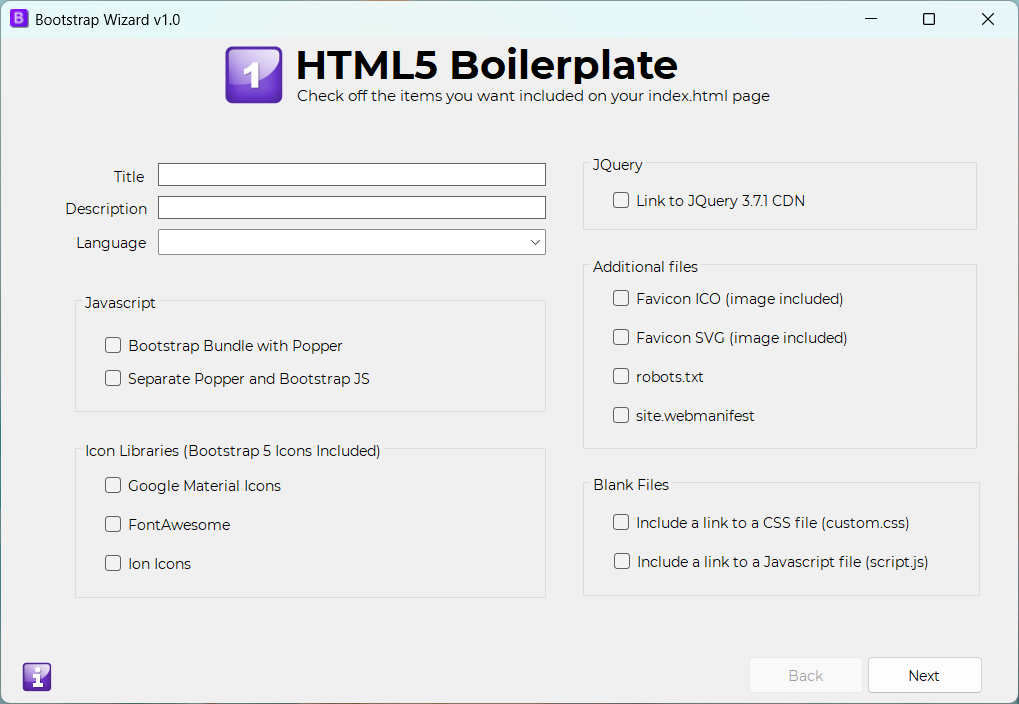
The HTML5 Boilerplate screen allows you to configure all the essential settings for your "index.html" file. From basic details such as the page title, description, and language to more advanced options like "robots.txt" and "site.webmanifest", this screen covers everything needed to set up your homepage.
JavaScript: You can choose to include the Bootstrap Bundle with Popper or opt for separate Popper and Bootstrap JS files, following Bootstrap 5's sample starter page.
Icon Libraries: Easily add popular icon libraries via CDN, including Google Material Icons, FontAwesome, and Ion Icons. Bootstrap 5 icons are automatically included.
jQuery: Select this option to include a link to jQuery 3.7.1 in your project.
Additional Files: This section allows you to include related files, such as favicons, "robots.txt", and "site.webmanifest" to your project.
Blank Files: For convenience, this option adds and links to blank "custom.css" and "script.js" files, giving you a clean slate for custom styling and scripts.
Back to Home